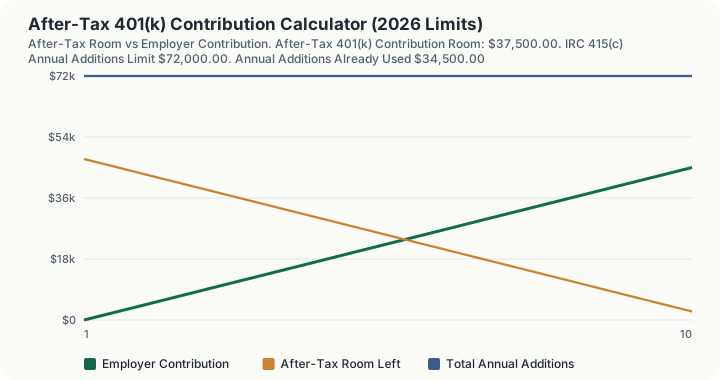
Quick Answer: A maxed $24,500 pre-tax deferral and $10,000 of employer money, on $200,000 of compensation at age 40, leave $37,500 of after-tax 401(k) contribution room this year. That is whatever is left of the $72,000 annual additions limit once deferrals and employer contributions are subtracted, and it is the raw material of the mega backdoor Roth.
What does this calculator do?
A 401(k) has three employee buckets, not two. Pre-tax and Roth deferrals share the section 402(g) elective deferral limit, which is $24,500 for 2026. After-tax (non-Roth) contributions are a third bucket that sits entirely outside section 402(g) and is bounded only by the section 415(c) annual additions limit of $72,000, which counts elective deferrals, employer contributions and after-tax contributions together.
After-tax room is therefore a residual, not an allowance. It is what is left of $72,000 once everything else has gone in. A generous employer match is genuinely valuable, but it eats after-tax room dollar for dollar, which is why two people on identical salaries can have wildly different after-tax capacity.
The second thing this calculator models is the basis and earnings split. After-tax contributions create basis: already-taxed money that converts to Roth tax free. Their earnings are not basis. Earnings are ordinary income when distributed and taxable when converted. Converting promptly, while earnings are near zero, is what makes the mega backdoor Roth cheap. Waiting years to convert is what makes it expensive. At the default of zero years before conversion the taxable earnings are zero and the conversion costs nothing.
How is this calculated?
After-tax room is a subtraction, then a floor at zero, then an optional plan cap:
Room = min(max(0, 415(c) Limit − Deferral − Employer), Plan Cap)
Step 1: Cap compensation at the section 401(a)(17) limit. min($200,000, $360,000) = $200,000
Step 2: Find the annual additions limit, which is the lesser of the statutory figure and your capped compensation. min($72,000, $200,000) = $72,000
Step 3: Count the deferral that consumes annual additions. Only the amount up to the section 402(g) limit counts; catch-up contributions are exempt under section 414(v)(3)(A)(i). min($24,500, $24,500) = $24,500
Step 4: Add the employer contributions. $24,500 + $10,000 = $34,500 of annual additions used
Step 5: Subtract to get the statutory headroom. $72,000 - $34,500 = $37,500
Step 6: Apply any plan-document percentage cap. The default is 0, meaning no plan cap was entered, so the statutory figure stands. $37,500 of available after-tax room
Step 7: Note your total personal capacity. Your deferral limit including catch-up, plus the after-tax room. $24,500 + $37,500 = $62,000
The conversion side splits the bucket into basis and earnings at the moment you convert:
Value at Conversion = Basis × (1 + g)^y; Taxable Earnings = Value − Basis
Step 8: Grow the after-tax basis to the conversion date. At the default of zero years before conversion there is no growth. $37,500 x 1.07^0 = $37,500
Step 9: Split out the taxable earnings. $37,500 - $37,500 = $0 of taxable earnings
Step 10: Price the tax on the conversion at your marginal rate. $0 x 24% = $0 of tax due
Step 11: Grow the converted Roth balance to withdrawal. $37,500 x 1.07^20 = $145,113.17, entirely tax free
Step 12: Grow the same money left unconverted in the after-tax bucket. The gross balance is identical, but the earnings are ordinary income at withdrawal. Earnings = $145,113.17 - $37,500 = $107,613.17 Tax at 22% = $107,613.17 x 0.22 = $23,674.90 $145,113.17 - $23,674.90 = $121,438.27
Step 13: The value of converting. $145,113.17 - $121,438.27 = $23,674.90
Worked Example
A 40-year-old earning $200,000 maxes the pre-tax deferral at $24,500 and receives $10,000 in employer match and profit sharing. Her plan permits after-tax contributions with no percentage cap, and permits in-service conversions.
Step 1: Her annual additions limit. $72,000, because her compensation is well above it.
Step 2: What is already used. $24,500 + $10,000 = $34,500.
Step 3: Her after-tax room. $72,000 - $34,500 = $37,500.
Step 4: Her total personal contribution capacity. $24,500 of deferral plus $37,500 after-tax = $62,000, which is more than two and a half times the deferral limit alone.
Step 5: She converts immediately. Zero years of growth means zero earnings, so the conversion is free: $0 of tax, and $37,500 lands in the Roth.
Step 6: Twenty years later. At 7% that Roth is worth $145,113.17, all of it tax free. The same money left in the after-tax bucket would reach the same gross balance but owe 22% on $107,613.17 of earnings, leaving $121,438.27.
Step 7: What converting bought her. $23,674.90, which is precisely the retirement tax on the earnings she avoided.
Change one variable and the mechanism becomes obvious. A $40,000 employer contribution instead of $10,000 leaves only $7,500 of after-tax room, because employer money and after-tax money compete for the same $72,000. And turning 55 raises the deferral limit to $32,500 through the catch-up but does not change the after-tax room at all, because catch-up contributions sit outside section 415(c) and neither consume nor create annual additions.
What does this calculator not account for?
- The ACP nondiscrimination test. This is the real reason many plans cap after-tax contributions well below the statutory headroom. The calculator does not run the test; it exposes a plan percentage cap as an input instead.
- Whether your plan permits any of this. After-tax contributions and in-service Roth conversions are both optional plan features. A large share of plans offer neither. Check your Summary Plan Description before acting on the number.
- Multiple unrelated employers. Section 415(c) applies per employer plan while section 402(g) applies per person. Only one plan is modelled.
- State income tax, NIIT, or IRMAA. Only the marginal federal rate you enter is applied to conversion earnings.
- Variable returns. Growth is a single annually-compounded rate, not a distribution of outcomes.
- The pro-rata allocation rules of Notice 2014-54 in a split rollover. The calculator assumes the after-tax bucket is converted whole.
What mistakes do people make with this?
- Confusing after-tax with Roth. Roth deferrals share the $24,500 limit with pre-tax deferrals. After-tax (non-Roth) contributions do not. They are separate features and many plans offer one without the other.
- Letting the money sit before converting. Every year of delay creates taxable earnings. Zero years costs nothing. Plans with automatic in-plan Roth conversion make this near-free; plans requiring a manual request each time do not.
- Assuming a big match is free money with no cost. It is free money, but it consumes annual additions room dollar for dollar and can eliminate your after-tax capacity entirely.
- Adding the catch-up to the annual additions arithmetic. Catch-up contributions are exempt from section 415(c). Including them understates after-tax room by up to $11,250.
- Forgetting that after-tax contributions are not deductible. They come out of take-home pay. The benefit is the conversion, not a current-year deduction.
Frequently Asked Questions
What is the 401(k) annual additions limit for 2026?
How much can I put in a mega backdoor Roth in 2026?
Do catch-up contributions reduce my after-tax room?
Why does my plan cap after-tax contributions at 10% of pay?
Is the conversion of after-tax money taxable?
Should I do this before or after maxing my HSA and IRA?
Sources
- IRS Notice 2025-67, "2026 Amounts Relating to Retirement Plans and IRAs": the $72,000 section 415(c)(1)(A) annual additions limit, the $24,500 section 402(g)(1) elective deferral limit, the $8,000 section 414(v)(2)(B)(i) catch-up and the $11,250 catch-up for ages 60 to 63. irs.gov/pub/irs-drop/n-25-67.pdf
- IRS Notice 2014-54, allocation of pre-tax and after-tax amounts among simultaneous direct rollovers. irs.gov/pub/irs-drop/n-14-54.pdf
- IRC section 415(c)(1)(A), section 402(g)(1), section 414(v)(3)(A)(i) and section 401(a)(17) ($360,000 compensation limit for 2026). law.cornell.edu/uscode/text/26/415