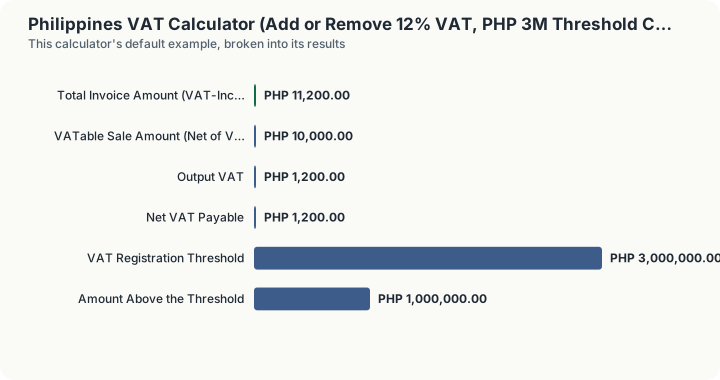
Quick Answer: A PHP 10,000 VAT-exclusive sale at the standard 12% rate carries PHP 1,200 of output VAT and produces a total invoice amount of PHP 11,200.00. On the default annual sales figure of PHP 4,000,000, the business is PHP 1,000,000 above the PHP 3,000,000 registration threshold, so VAT registration is mandatory.
What does this calculator do?
Value-added tax in the Philippines is imposed at 12% on the sale, barter or exchange of goods and properties under Section 106 of the National Internal Revenue Code, and on the sale or exchange of services under Section 108. It is an indirect tax: the seller charges it to the customer, collects it, and remits the net amount to the Bureau of Internal Revenue after crediting the VAT the seller itself paid on purchases.
This calculator does three jobs. It adds VAT to a VAT-exclusive price. It works backward from a VAT-inclusive total to recover the underlying VATable sale amount and the output VAT hidden inside it. And it checks your annual gross sales against the PHP 3,000,000 registration threshold that decides whether you should be a VAT taxpayer at all.
That threshold matters more than the rate for most small Philippine businesses. Section 109(BB), as amended by the TRAIN Law, exempts a taxpayer whose gross annual sales or receipts do not exceed PHP 3,000,000. Below the line you may register as a non-VAT taxpayer and pay percentage tax instead. Above it, VAT registration is compulsory, you must issue VAT invoices, file VAT returns, and account for output and input VAT.
The rate field is adjustable rather than fixed at 12% for a specific reason: zero-rated sales exist. Export sales and certain services rendered to non-residents carry a 0% rate while still allowing the seller to credit input VAT, which is a materially different position from being exempt. Setting the rate to zero models that case.
How is this calculated?
Adding VAT to a VAT-exclusive selling price:
Output VAT = Net of VAT × VAT Rate
Total Invoice Amount = Net of VAT + Output VAT
Removing VAT from a VAT-inclusive total, which is division rather than multiplication:
Net of VAT = (Total Invoice Amount)/(1 + VAT Rate)
Output VAT = Total Invoice Amount − Net of VAT
The amount actually remitted is output VAT less creditable input VAT:
Net VAT Payable = Output VAT − Input VAT
And the threshold test compares annual gross sales against the statutory figure:
Headroom = max(3,000,000 − Annual Gross Sales, 0)
Overage = max(Annual Gross Sales − 3,000,000, 0)
Section 109(BB) exempts sales that "do not exceed" PHP 3,000,000, so a taxpayer sitting exactly on PHP 3,000,000 is still below the line, with neither headroom nor overage.
Worked Example
Scenario 1: adding 12% VAT to a PHP 10,000 sale.
A VAT-registered consultancy bills a client PHP 10,000 for services.
Step 1: Apply the rate to the VAT-exclusive price.
10,000 × 12% = 1,200
Output VAT: PHP 1,200.00
Step 2: Add the VAT to the sale amount.
10,000 + 1,200 = 11,200
Total invoice amount: PHP 11,200.00
The invoice must show PHP 10,000 as VATable sales and PHP 1,200 as VAT, on separate lines.
Scenario 2: extracting the VAT from a PHP 11,200 all-in quote.
Step 1: Divide the inclusive total by one plus the rate.
11,200 ÷ 1.12 = 10,000
VATable sale amount: PHP 10,000.00
Step 2: The VAT is the difference.
11,200 − 10,000 = 1,200
Output VAT: PHP 1,200.00
This confirms the two scenarios are the same transaction expressed two ways.
Scenario 3: netting input VAT.
Suppose the same seller paid PHP 800 of VAT on creditable purchases in the period.
Step 1: Subtract input VAT from output VAT.
1,200 − 800 = 400
Net VAT payable: PHP 400.00
Scenario 4: the threshold check.
The business expects PHP 4,000,000 of gross receipts for the year.
Step 1: Compare against the statutory threshold.
4,000,000 − 3,000,000 = 1,000,000
Above the threshold by PHP 1,000,000. VAT registration is mandatory.
What does this calculator not account for?
- Which rate applies to your specific transaction. The calculator applies whatever rate you select. It does not classify your goods or services, and it does not determine whether a sale is standard-rated, zero-rated or exempt. That classification is a legal question about your transaction.
- The difference between zero-rated and exempt. Setting the rate to 0% models a zero-rated sale, where input VAT remains creditable. VAT-exempt transactions under Section 109 are different: no output VAT is charged and input VAT is not creditable either. The calculator does not distinguish the two.
- Percentage tax. A non-VAT taxpayer below the threshold owes percentage tax on gross receipts instead of VAT. That tax is not computed here.
- Whether your input VAT is actually creditable. Input VAT must be properly substantiated and attributable to VATable sales to be credited. Amounts entered in the input VAT field are taken at face value.
- Input VAT carry-over and refund rules. If input VAT exceeds output VAT the excess is generally carried forward, not refunded in cash. The calculator will show a negative net VAT payable, but it does not model the carry-over mechanics or the refund rules for zero-rated sales.
- Withholding VAT on government sales. Sales to government or government-controlled corporations are subject to a separate final withholding arrangement not modelled here.
- Registration timing. Exceeding the threshold triggers registration obligations with their own deadlines. The calculator reports the arithmetic position, not the compliance timetable.
What mistakes do people make with this?
- Multiplying an already inclusive price by 12%. If a quote is VAT-inclusive, multiplying by the rate rather than dividing by 1.12 overstates both the tax and the total. Confirm which figure you are holding before choosing a direction.
- Dividing by 0.88 instead of 1.12. A common shortcut error when backing VAT out of an inclusive total. The correct divisor is one plus the rate.
- Treating exempt and zero-rated as the same thing. They produce the same output VAT of zero but opposite input VAT treatment, which is often the more valuable half.
- Testing the threshold against a single sale. The PHP 3,000,000 test is on annual gross sales or receipts, not on any individual invoice.
- Forgetting that the threshold is a "do not exceed" test. Sales of exactly PHP 3,000,000 are still within the exemption. Only sales above it trigger mandatory registration.
- Assuming registration is optional once you cross the line. It is not. Above the threshold VAT registration is compulsory regardless of preference.
Frequently Asked Questions
What is the VAT rate in the Philippines?
How do I remove VAT from a total in the Philippines?
What is the VAT threshold in the Philippines?
What is the difference between output VAT and input VAT?
Is a zero-rated sale the same as a VAT-exempt sale?
Do I still charge VAT if I am below the threshold?
Sources
- National Internal Revenue Code of 1997, as amended, Sections 106(A) and 108(A) (12% value-added tax on sales of goods and of services), published by the Bureau of Internal Revenue. bir.gov.ph/tax-code
- Bureau of Internal Revenue (Philippines), the official authority for the national tax authority this calculator relates to. bir.gov.ph