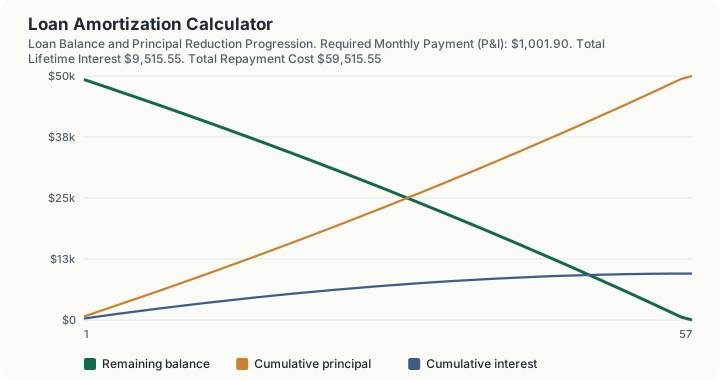
Quick Answer: An amortization schedule breaks every loan payment into a principal portion and an interest portion, and this calculator shows you exactly how that split shifts from mostly interest at the start to mostly principal near the end.
Overview
Amortization is the process of paying off a fixed-rate loan through a series of equal periodic payments, where each payment covers the interest owed for that period plus a chunk of the remaining balance. It applies to mortgages, car loans, student loans, personal loans, and any other installment debt with a set term and a fixed rate. This calculator is the generic engine behind that math: enter a principal balance, an annual interest rate, a term in months, and an optional extra monthly payment, and it produces a full period-by-period table plus the four numbers borrowers actually care about: the required monthly payment, the total interest paid over the life of the loan, the total repayment cost, and how much time and money an extra payment saves.
Unlike calculators labeled for a specific loan type (auto, mortgage, student), this one has no built-in tax rates, insurance estimates, or fee assumptions. It is the raw amortization math with nothing added, which makes it the right tool when you already know your principal and rate and just want to see the schedule, or when you want to compare how extra payments affect a loan regardless of what the loan is actually for.
How This Is Calculated
The engine uses the standard fixed-payment amortization formula. For a loan with principal $P$, monthly interest rate $i$ (the annual rate divided by 12), and $n$ total monthly payments, the fixed monthly payment $A$ that fully retires the loan is:
Each month, the interest charge is the current balance multiplied by $i$. The remainder of that month's payment reduces the principal, and the new (lower) balance becomes the base for next month's interest charge. This is why early payments are interest-heavy: the balance is still large, so a bigger share of each payment goes to interest. As the balance shrinks, the interest charge shrinks with it, and a growing share of the fixed payment goes to principal.
When an extra payment is added, that amount goes entirely toward reducing principal on top of the scheduled payment. Because interest is always calculated on the current balance, a smaller balance next month means a permanently smaller interest charge every month after that, which is why extra payments save more in total interest than the extra dollars paid alone would suggest, and why they shorten the loan term. The calculator runs this period-by-period simulation to completion, tracking cumulative principal, cumulative interest, and remaining balance at every step, then sums the results to produce total interest and total cost. All arithmetic is performed with decimal-precision math rather than standard floating-point numbers, which avoids the fractional rounding drift that can appear in spreadsheet amortization tables over long schedules.
If the interest rate is entered as 0%, the formula above is undefined (division by zero), so the calculator falls back to simple division: payment equals principal divided by the number of periods, and total interest is zero.
Worked Example
Take a $50,000 loan at 7.50% annual interest over 60 months, paying only the contractual minimum.
Step 1 -- The periodic rate. 7.50% / 12 = 0.625% per month, or i = 0.00625
Step 2 -- The level payment. $50,000 x [0.00625 x 1.00625^60] / [1.00625^60 - 1] = $1,001.90 a month
Now follow the split, because the payment is constant and the split inside it is not.
Step 3 -- Month 1 interest. $50,000.00 x 0.00625 = $312.50
Step 4 -- Month 1 principal. $1,001.90 - $312.50 = $689.40
Step 5 -- Balance entering month 2. $50,000.00 - $689.40 = $49,310.60
Step 6 -- Month 2 interest, on the new balance. $49,310.60 x 0.00625 = $308.19, which is $4.31 less than month 1
Step 7 -- Month 2 principal. $1,001.90 - $308.19 = $693.71
Step 8 -- Cumulative interest after two payments. $312.50 + $308.19 = $620.69, against $1,383.11 of principal retired
Step 9 -- The halfway mark, month 30. Interest that month is down to $175.97 and principal is up to $825.93. Cumulative interest stands at $7,386.59, and the balance is $27,329.59
Step 10 -- The final payment, month 60. Interest of $6.22, principal of $995.50, and a total payment of $1,001.72 rather than $1,001.90, the one-cent adjustment that lands the balance on exactly zero
Step 11 -- Lifetime totals. Total interest $10,113.82, total repaid $60,113.82
Note what steps 9 and 11 say together. By month 30, half the term, the borrower has paid 73% of the loan's total interest but retired only 45% of the principal. Front-loading is not a fee; it is arithmetic on a declining balance.
Now add $50 a month to the same loan.
Step 12 -- The new outlay. $1,001.90 + $50.00 = $1,051.90, about 5% more each month
Step 13 -- Month 1 with the extra principal. Interest is unchanged at $312.50, but principal retired rises to $739.40, leaving $49,260.60
Step 14 -- Month 2 interest, on that smaller balance. $49,260.60 x 0.00625 = $307.88, already $0.31 below the base schedule, and that gap compounds every month afterwards
Step 15 -- When the loan ends. Month 57 rather than month 60, with a final payment of $609.15 rather than a full one
Step 16 -- Total interest with the extra payment. $9,515.55
Step 17 -- What the extra $50 bought. $10,113.82 - $9,515.55 = $598.27 of interest saved and 3 months removed from the term
The borrower paid roughly $2,800 of extra principal across the shortened schedule and got back $598.27 in avoided interest plus three months of freedom, because each extra dollar stops accruing interest from the month it lands rather than at the end of the loan.
The rate input on this page floors at 0.1%, so a genuine 0% loan cannot be entered here, but the engine handles that case if it arrives: with a zero periodic rate the payment formula divides by zero, so it falls back to principal divided by the number of periods and reports zero total interest.
What This Does Not Account For
- Origination fees, closing costs, or points. These are separate from principal and are not folded into this generic schedule; loan-specific calculators (mortgage, auto) add fees where relevant.
- Variable or adjustable rates. This calculator assumes one fixed rate for the entire term. Adjustable-rate loans need to be modeled period by period as the rate resets.
- Prepayment penalties. Some loan agreements charge a fee for paying off early or making extra principal payments; check your loan terms before assuming the full projected savings apply.
- Tax deductibility of interest. For loans where interest may be deductible (such as some mortgages), this tool shows the pre-tax interest cost only.
- Payment timing quirks. The schedule assumes payments land exactly on the period boundary with no grace periods, late fees, or day-count adjustments.
- Insurance, taxes, or escrow. For a mortgage specifically, monthly housing costs typically include property tax and homeowners insurance on top of principal and interest; use a mortgage-specific calculator for a full payment estimate.
Common Pitfalls
- Confusing the payment amount with the interest rate. A lower monthly payment doesn't necessarily mean a cheaper loan; a longer term can lower the payment while raising total interest paid.
- Assuming extra payments shorten the term by the same proportion as the extra dollar amount. The relationship is nonlinear because it depends on how much interest was going to accrue on the eliminated balance.
- Applying an extra payment as a principal reduction when the lender actually applies it to a future scheduled payment. Always confirm with your servicer that extra payments are marked "apply to principal," otherwise you may not get the interest savings this schedule projects.
- Comparing two loans by monthly payment alone. A shorter, higher-payment loan often costs far less in total interest than a longer, lower-payment loan for the same principal and rate.
- Forgetting that the interest rate here is the rate applied per period, not an average. A 7.5% annual rate compounded monthly is not the same as paying 7.5% of the principal in interest over the life of the loan; actual total interest depends heavily on the term length.
- Ignoring rounding on the final payment. Because the standard formula produces a level payment that rarely brings the balance to exactly zero, the last payment in a real schedule is almost always a slightly different amount than the rest.
Frequently Asked Questions
What is the difference between amortization and simple interest?
Why is so much of my early payment interest instead of principal?
How much can extra payments actually save me?
Does a 0% interest loan need an amortization schedule?
Can I use this for a mortgage or auto loan instead of amortization-only debt?
Why does my lender's payment amount differ slightly from this calculator?
Sources
- Truth in Lending Act (Regulation Z), 12 CFR Part 1026: Governs disclosure requirements for consumer credit, including the formulas used to compute annual percentage rate and finance charges. ecfr.gov/current/title-12/chapter-X/part-1026
- Consumer Financial Protection Bureau: Guidance on how amortization works for mortgages and other installment loans, including sample amortization schedules. consumerfinance.gov