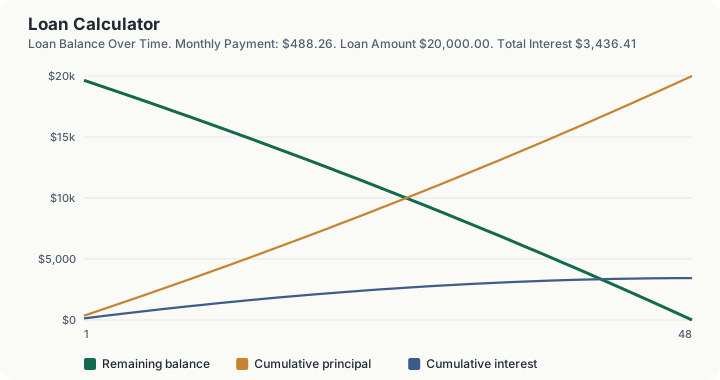
Quick Answer: A $20,000 loan at 8.0% APR over 48 months carries a monthly payment of $488.26, with $3,436.41 in total interest and $23,436.41 repaid in total.
Overview
This is the plainest version of a loan calculator on this platform: three inputs, loan amount, interest rate, and term, and one output, the monthly payment, plus the total interest and total cost that come with it. It works for any fixed-rate, fixed-term loan: personal loans, debt consolidation loans, equipment financing, a private note between two parties, or any other loan where the lender charges a fixed rate and expects level monthly payments until the balance hits zero.
If you want to see the effect of extra principal payments on the payoff timeline, or need a full period-by-period schedule with CSV export for a specific prepayment strategy, use this platform's loan amortization calculator instead. That tool is built around modeling extra payments and their effect on interest saved. This one is built for a fast answer to a simple question: how much will the loan cost every month.
The math is the standard fixed-rate amortization formula, the same one used by every lending calculator on this platform, applied here with no domain-specific assumptions, no tax, no fees, no insurance. Just principal, rate, and term.
How This Is Calculated
- Monthly interest rate. The entered annual interest rate is divided by 12 to get the periodic rate applied each month.
- Monthly payment. The loan amount is amortized over the chosen term using the standard fixed-payment formula:
where $P$ is the loan amount, $i$ is the monthly interest rate, and $n$ is the number of monthly payments. When the interest rate is zero, the payment is simply the loan amount divided evenly by the number of months.
- Total interest. The monthly payment multiplied by the number of payments, minus the original loan amount.
- Total cost. The loan amount plus total interest, equal to the sum of every scheduled payment.
- Finding how much you can borrow. When you choose to enter the payment instead, the calculator runs the same relationship in reverse. The largest loan a monthly payment supports is the present value of that payment stream:
That loan amount then feeds steps 3 and 4, so the interest and total cost shown are for the loan the payment actually buys. A $500 monthly payment at 8% over 48 months supports a loan of $20,480.96.
Worked Example
Using the calculator's default inputs:
- Loan Amount: $20,000.00
- Interest Rate: 8.0% APR
- Term: 48 months
Step by step:
- Monthly interest rate: 8.0% divided by 12 equals approximately 0.6667%
- Monthly payment at 8.0% over 48 months: $488.26
- Total interest paid, summed across all 48 scheduled payments: $3,436.41
- Total of all 48 payments: $23,436.41
Reading the 48-Row Schedule, and Pricing Each Input
The schedule under the calculator is a real period-by-period amortization, not a parameter sweep, and the useful thing in it is where the split between interest and principal moves.
Where the payment turns. Payment one is $488.26 made of $354.93 principal and $133.33 interest. By payment 24 the same $488.26 is $413.53 principal and $74.73 interest. By payment 47 it is $481.81 principal and $6.45 interest. Principal already exceeds interest in month one on this loan, which is a property of a short 48-month term: on a 30-year mortgage at the same rate the crossover would not arrive for years. The outstanding balance falls from $19,645.07 after the first payment to $484.96 after the forty-seventh.
The last payment is not the same as the other forty-seven. Row 48 shows a payment of $488.19, two cents above the level payment, because the schedule closes the balance exactly to zero rather than leaving a rounding remainder. That is why total cost reads $23,436.41, which is $488.26 x 47 plus $488.19.
One reconciliation to be aware of. The total interest output is $3,436.41, the sum of the schedule's interest column. Total cost minus the loan amount is $3,436.50, eight cents higher, because total cost is built from the payment stream and total interest from the per-period interest column, each rounded to the cent independently. Eight cents on a $20,000 loan is not a modelling error worth chasing, but the two numbers will not tie exactly and it is better to know that than to hunt for it.
Marginal cost of the next unit, on each of the three inputs. Raising the loan amount from $20,000 to $21,000 lifts the payment from $488.26 to $512.67 and total interest to $3,608.23, so each extra $1,000 borrowed costs $24.41 a month and $171.81 in interest. Raising the rate one point from 8.0% to 9.0% lifts the payment to $497.70 and total interest to $3,889.60, so a single point of rate costs $453.18 across this loan. Those two are worth comparing directly: on a 48-month term, one point of APR costs more than $2,500 of extra principal would.
The term trade, priced in both directions. Stretching from 48 to 60 months cuts the payment to $405.53, a saving of $82.73 a month, and raises total interest to $4,331.66, an extra $895.24. Shortening to 36 months raises the payment to $626.73 and cuts total interest to $2,562.15, saving $874.27. Twelve months of term is worth roughly $880 of interest in either direction on this loan, which is the number the "should I take the longer term" question actually turns on.
The zero-rate branch, which is a real code path and not a rounding case. Enter 0% and the calculator divides the principal evenly: $416.67 a month, $0.00 of interest and a total cost of exactly $20,000.00. Promotional financing genuinely produces this, and the calculator handles it without dividing by zero.
What no figure here contains. No origination fee is deducted, so the loan amount is what you owe rather than what you receive; no extra principal is applied, because extraPerPeriod is passed as zero by this configuration; and no late fee, prepayment penalty or insurance is modelled. A loan quoted with a 3% origination fee on $20,000 disburses $19,400 while this page prices repayment of the full $20,000.
What This Does Not Account For
- Origination fees. Many personal and business loans deduct a fee from the disbursed amount, meaning the amount you actually receive can be less than the amount you owe and repay. This calculator's loan amount is the amount owed, not the amount received.
- Extra or prepaid principal. This calculator assumes the exact scheduled payment every month with no extra principal added. For a prepayment strategy and the interest savings it produces, use this platform's loan amortization calculator.
- Variable interest rates. If your loan's rate can change over time, actual payments will diverge from this calculator's fixed-rate projection as the rate moves.
- Late fees or missed payment penalties. This is a scheduled-payment model assuming every payment is made on time and in full.
- Domain-specific costs. This calculator does not add sales tax, property tax, insurance, or any other cost specific to a particular type of loan; it is deliberately generic. For a car loan with sales tax and fees, a mortgage with property tax and insurance, or a student loan with federal repayment terms, use this platform's dedicated calculators for those loan types.
Common Pitfalls
- Comparing loans by monthly payment alone. Two loans with the same monthly payment can have very different total costs if the term lengths differ; always compare total interest or total cost, not just the payment.
- Entering the amount received instead of the amount owed. If your loan carries an origination fee deducted at disbursement, the balance you actually owe and repay is higher than the amount that lands in your account.
- Assuming a longer term is strictly worse. A longer term raises total interest but can be the right call if it keeps the monthly payment within a manageable share of your budget; the tradeoff depends on your situation, not a fixed rule.
- Ignoring how a rate quote is measured. A quoted "interest rate" and the loan's true APR can differ once fees are factored in. Use the APR figure for the most accurate comparison across loan offers.
- Not checking for prepayment penalties. Some loans charge a fee for paying off the balance early. If you plan to pay extra or pay off the loan ahead of schedule, confirm your loan does not penalize that before assuming the interest savings this calculator's amortization companion tool would project.
Frequently Asked Questions
What kinds of loans can I model with this calculator?
How is this different from the loan amortization calculator?
Does this calculator include fees?
What happens if I enter a 0% interest rate?
Why does the total cost exceed the loan amount?
Can I use this to compare two different loan offers?
Sources
- Consumer Financial Protection Bureau: Personal loan and installment credit disclosure guidance. consumerfinance.gov
- Federal Reserve Board: Regulation Z Truth in Lending Act requirements for APR disclosure on closed-end credit. ecfr.gov/current/title-12/chapter-X/part-1026
- Federal Trade Commission: Consumer guidance on comparing loan offers and total cost of credit. consumer.ftc.gov