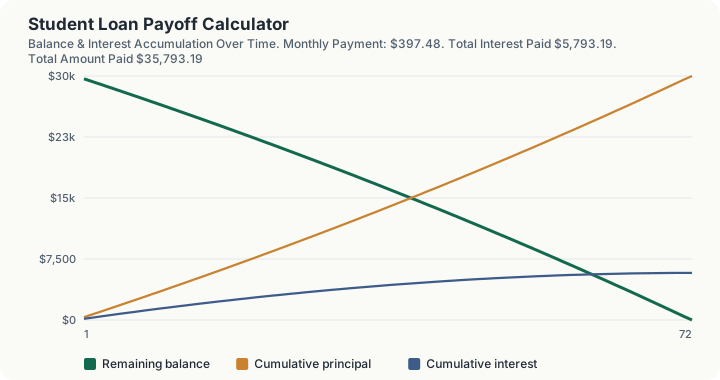
Quick Answer: A $30,000 student loan balance at 6% interest budgeted at $400 a month clears in 95 months, and re-amortized across exactly those 95 months the payment settles at $397.48. Solving the other direction, a 10-year payoff target on the same balance requires $333.06 a month, and adding $200 extra toward principal every month cuts that down to 67 months while saving roughly $4,650.03 in total interest.
Overview
Student loan payoff planning usually comes from one of two directions. Either you know what you can afford to pay each month and want to know how long you will be paying, or you have a target date in mind, "I want this gone in 10 years," and need to know what payment gets you there. This calculator handles both directions with the same underlying amortization math, because a fixed-rate student loan is, mechanically, no different from a mortgage or an auto loan: a balance, an interest rate, and a payment that splits between interest and principal every month until the balance reaches zero.
The calculator also answers the question most payoff planning tools skip: what happens if I pay extra? Every dollar paid above the required minimum goes straight to principal, which compounds in your favor exactly the way interest compounds against you on an unpaid balance. This calculator runs that scenario directly, showing both the reduced payoff time and the total interest saved by adding a chosen extra amount every month, rather than making you guess or run the numbers twice yourself.
How This Is Calculated
When you know your payment and want the payoff time (byPayment mode): the calculator solves for the number of periods using the standard time-value-of-money equation, given your loan balance, interest rate, and monthly payment:
where $PV$ is your current balance, $PMT$ is your monthly payment (as a cash outflow), and $i$ is the monthly interest rate. Because a real payoff happens on a whole month, this result is rounded up to the next full month, and the calculator then generates the exact schedule for that many months.
If your entered payment does not even cover the interest accruing each month, the loan mathematically never pays off. The calculator flags this directly rather than returning a nonsensical result.
When you know your target timeline and want the required payment (byTimeline mode): the calculator uses the standard amortization formula, converting your target years into months and solving for the payment that fully pays off the balance in exactly that many months:
Extra payments: in either mode, any extra monthly amount you specify is applied directly to principal every month on top of the required payment. The schedule recalculates how quickly the balance actually reaches zero under that higher effective payment, and the calculator reports both the number of months saved and the total interest saved compared to making only the required payment.
Worked Example
Solving for required payment: a $30,000 balance at 6% interest, targeting a 10-year (120-month) payoff.
- Monthly interest rate: 6% ÷ 12 = 0.5%.
- Required monthly payment: applying the amortization formula to $30,000 over 120 months at 0.5% monthly gives $333.06.
- Total interest paid over 10 years: $9,967.38.
Solving for payoff time: the same $30,000 balance at 6%, but this time you know you can pay $400 a month and want to know how long it takes.
- Interest-only payment check: $30,000 × 0.5% = $150. Since $400 comfortably exceeds this, the loan will pay off.
- Solved number of months: approximately 94.24 months, rounded up to 95 whole months.
- Actual monthly payment at 95 months: re-amortizing $30,000 over exactly 95 months gives $397.48, slightly below your $400 budget, since rounding up to a whole month means you pay very slightly less than $400 each month to hit exactly zero at the end.
Adding an extra payment: take the 10-year, $333.06/month scenario and add $200 extra every month.
- New effective monthly payment: $333.06 + $200 = $533.06 applied to a balance that started needing 120 months at the lower payment.
- New payoff time: 67 months instead of 120, a savings of 53 months, more than four years.
- New total interest: $5,317.35 instead of $9,967.38, a savings of $4,650.03.
What This Does Not Account For
This calculator models a single fixed-rate loan with a level monthly payment. It does not model variable-rate loans, where the interest rate itself changes over time and would require re-solving the schedule at each rate change. It does not account for multiple loans with different rates and balances, which is the actual situation for many borrowers with a mix of federal and private loans; each loan should be modeled separately, or consolidated into a single blended rate before using this calculator. It does not model income-driven repayment plans, forbearance, deferment, or loan forgiveness programs, all of which change the effective payoff math in ways a standard amortization schedule cannot capture; a separate income-driven repayment calculator is the right tool for that. It assumes every extra payment is applied to principal immediately and does not model a servicer's specific payment application order, which can occasionally differ.
Common Pitfalls
Borrowers often assume a slightly higher monthly payment produces a proportionally faster payoff, when in reality even modest extra payments produce outsized reductions in total interest early in a loan's life, because more of each payment goes to principal instead of interest once the balance starts shrinking. It is also easy to enter a monthly payment that barely covers, or does not cover, the interest accruing each month, especially on higher-rate private loans, without realizing that such a payment will never reduce the balance at all, only maintain it or let it grow. Many borrowers also solve for the required payment on a target timeline and then round it down "close enough," not accounting for how even a small shortfall compounds into a materially longer actual payoff time. Finally, treating multiple loans as one combined balance with one blended rate, rather than running each loan separately, can produce a payoff estimate that does not match reality if the loans have meaningfully different rates.
Frequently Asked Questions
Does paying extra every month always save the same amount of interest?
What if I can only afford the exact interest-only payment?
Should I round my payoff-timeline payment up or down from what this calculator shows?
Is it better to pay extra toward my student loan or invest that money instead?
Can I use this calculator for a loan that already has some months of payment history?
Sources
- Standard closed-form time-value-of-money amortization and NPER-solving formulas, consistent with those published by the Consumer Financial Protection Bureau and used throughout consumer lending disclosure. consumerfinance.gov
- U.S. Department of Education, Federal Student Aid, general guidance on standard repayment plan mechanics (loan.gov / studentaid.gov). studentaid.gov