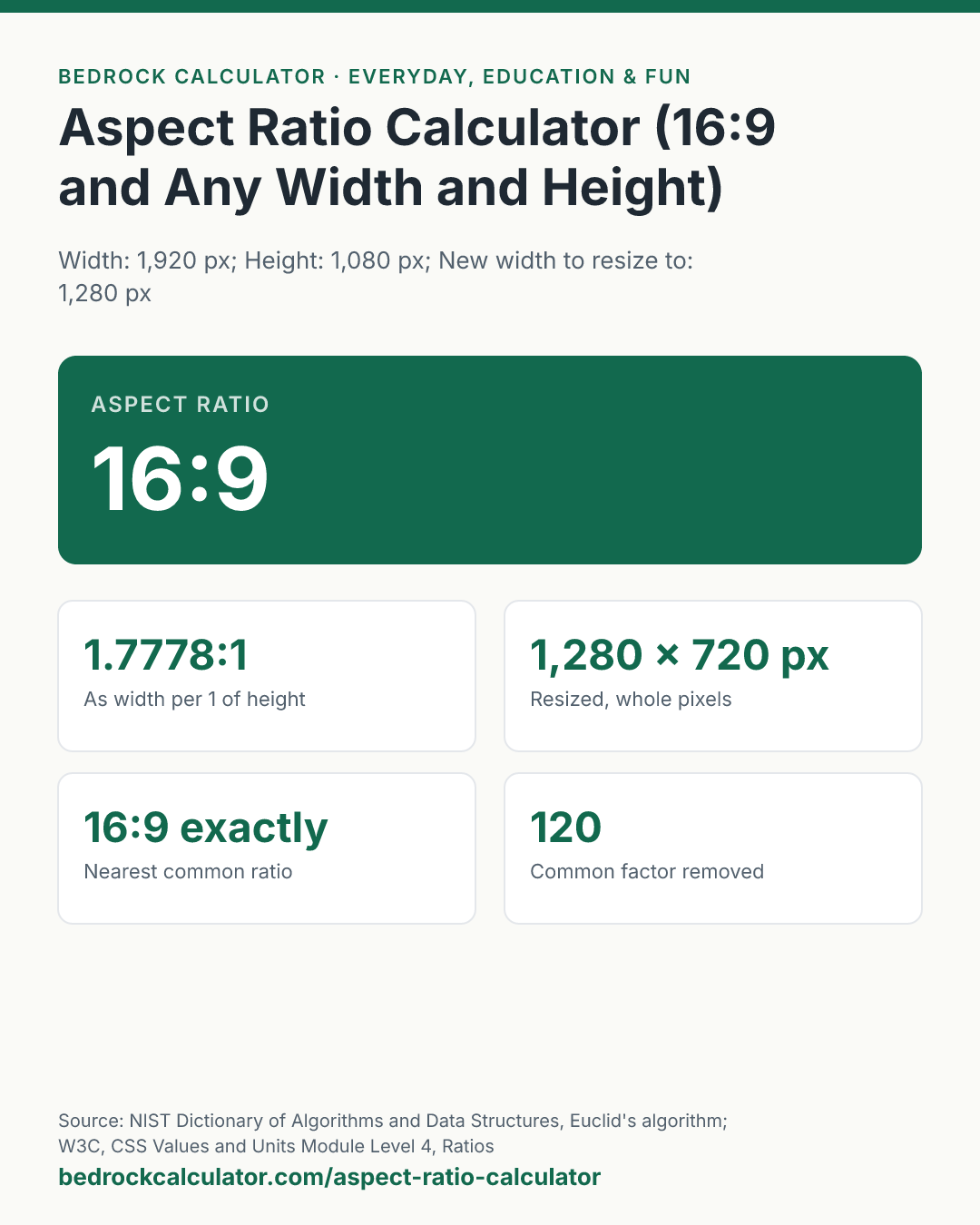

Quick Answer: 1920 by 1080 reduces to 16:9, which is 1.7778:1. Resized to 1,280 pixels wide at the same shape, it is 720 pixels tall.
What does this calculator do?
This aspect ratio calculator reduces any width and height to their simplest whole-number ratio, such as 16:9 or 4:3, and works out the height that keeps that shape when you change the width. It also writes the ratio as a single decimal, the way film formats are quoted, and names the nearest of the common screen and photo ratios.
An aspect ratio is the shape of a rectangle, not its size. A 1280 by 720 video and a 3840 by 2160 video are both 16:9: one is just three times bigger in each direction. The reduction is done exactly, by dividing both sides by their greatest common divisor, so the calculator never rounds 1366 by 768 to 16:9 when it is not. It reports the true ratio, 683:384, and separately tells you it is within a fraction of a percent of 16:9.
The units do not matter as long as both sides use the same one. Pixels, inches and centimetres all give the same ratio.
Using the Aspect Ratio Calculator
- Enter the Width and Height of the image, screen or video.
- Enter a New width to resize to, if you want to scale it.
- Read the ratio at the top. The cards show the decimal form, the new height to two places and to the nearest whole pixel, the nearest common ratio, the factor that was removed, and whether the shape is landscape, portrait or square.
To fix the height and find the width instead, swap the two: enter the height as the width and the width as the height, and read the answer the same way. The presets cover a Full HD video, a common laptop screen, a vertical phone video, a camera photo and an ultrawide monitor.
How is this calculated?
- Make both sides whole numbers. If either side has decimals, both are multiplied by the same power of ten, so 2.39 by 1 becomes 239 by 100. That does not change the shape.
- Find the greatest common divisor. Euclid's algorithm divides the larger number by the smaller, keeps the remainder, and repeats until the remainder is zero. The last divisor is the greatest common divisor. For 1920 and 1080 it is 120.
- Reduce. Both sides are divided by the greatest common divisor. 1920 ÷ 120 = 16 and 1080 ÷ 120 = 9, so the ratio is 16:9.
ratio = width/(gcd(width, height)):height/(gcd(width, height))
- Scale. The height for a new width keeps the ratio. It is shown to two decimal places and, on the whole-pixel card, rounded half up to the nearest pixel.
new height = new width × height/width
- Compare with common ratios. The width divided by the height is compared with 1:1, 5:4, 4:3, 3:2, 16:10, 16:9, 1.85:1, 2:1, 21:9 and 2.39:1, and the closest by relative difference is named. A portrait shape is compared on its side and named the other way round, such as 9:16.
Worked Example
The default, 1920 by 1080, resized to 1,280 wide:
- Euclid's algorithm on 1920 and 1080: 1920 = 1 × 1080 + 840; 1080 = 1 × 840 + 240; 840 = 3 × 240 + 120; 240 = 2 × 120 + 0. The greatest common divisor is 120.
- 1920 ÷ 120 = 16 and 1080 ÷ 120 = 9: 16:9.
- As a decimal, 1920 ÷ 1080 = 1.7778:1.
- At 1,280 wide, the height is 1,280 × 1080 ÷ 1920 = 720 pixels.
A 6000 by 4000 camera photo reduces to 3:2 (the common factor is 2,000) and at 1,200 pixels wide it is 800 tall.
What Is 16:9?
16:9 is the shape of almost every television, computer monitor and online video today: 16 units wide for every 9 units tall, or 1.7778 times as wide as it is tall. 1280 by 720, 1920 by 1080, 2560 by 1440 and 3840 by 2160 are all exactly 16:9. Turned on its side for a phone, the same shape is 9:16.
The second table lists 16:9 heights for common widths; some widths, such as 854, do not give a whole-pixel height.
Why Is My Screen Not Exactly 16:9?
Some screens are sold under a ratio they only approximate. A 1366 by 768 laptop screen is really 683:384, which is 1.7786:1 against 1.7778:1 for 16:9, a difference of 0.05%.
Ultrawide monitors marketed as 21:9 are usually 2560 by 1080, which is 64:27, or 3440 by 1440, which is 43:18; both are closer to the 2.39:1 film ratio than to a true 21:9.
What does this calculator not account for?
- Pixel aspect ratio. The calculator assumes square pixels, which is true for computer screens and modern video. Some older broadcast and DVD formats store non-square pixels, so their stored size and their displayed shape differ.
- Cropping versus letterboxing. The calculator keeps the shape. It does not tell you how much to crop to change shape, or how wide the bars will be when a 4:3 picture is shown on a 16:9 screen.
- Rounding to whole pixels. A resized height is often not a whole number. Rounding it makes the new image very slightly off the original ratio, and video encoders may also require even numbers.
- Very long decimals. Decimal sides are scaled by a power of ten before reducing, so 1.333 by 1 is treated as 1333:1000, not 4:3. Enter whole numbers when you have them.
- Physical size. A screen's diagonal size in inches does not tell you its ratio. Measure or look up the width and height.
What mistakes do people make with this?
- Rounding the ratio by eye. 1366 by 768 looks like 16:9 and nearly is, but using 16:9 to resize it gives a slightly different height.
- Swapping width and height. 9:16 and 16:9 are the same shape turned 90 degrees, and the resize answer is different for each. Width always goes first.
- Mixing units. A width in inches and a height in centimetres gives a meaningless ratio.
- Expecting 21:9 to mean 21:9. Most ultrawide monitors are 64:27 or 43:18. Check the pixel size, not the label.
- Scaling both sides by the same number of pixels. Adding 100 pixels to each side changes the shape. Multiply both sides by the same factor instead.
Frequently Asked Questions
What is the aspect ratio of 1920 by 1080?
How do I calculate the height for a 16:9 image?
What aspect ratio is a phone screen?
What is the ratio of a 6000 by 4000 photo?
Is 16:10 the same as 8:5?
What does 2.39:1 mean?
Sources
- NIST Dictionary of Algorithms and Data Structures, Euclid's algorithm: computing the greatest common divisor of two positive integers. xlinux.nist.gov/dads/HTML/euclidalgo.html
- W3C, CSS Values and Units Module Level 4, Ratios: a ratio written as width then height, as used by the CSS aspect-ratio property. w3.org/TR/css-values-4