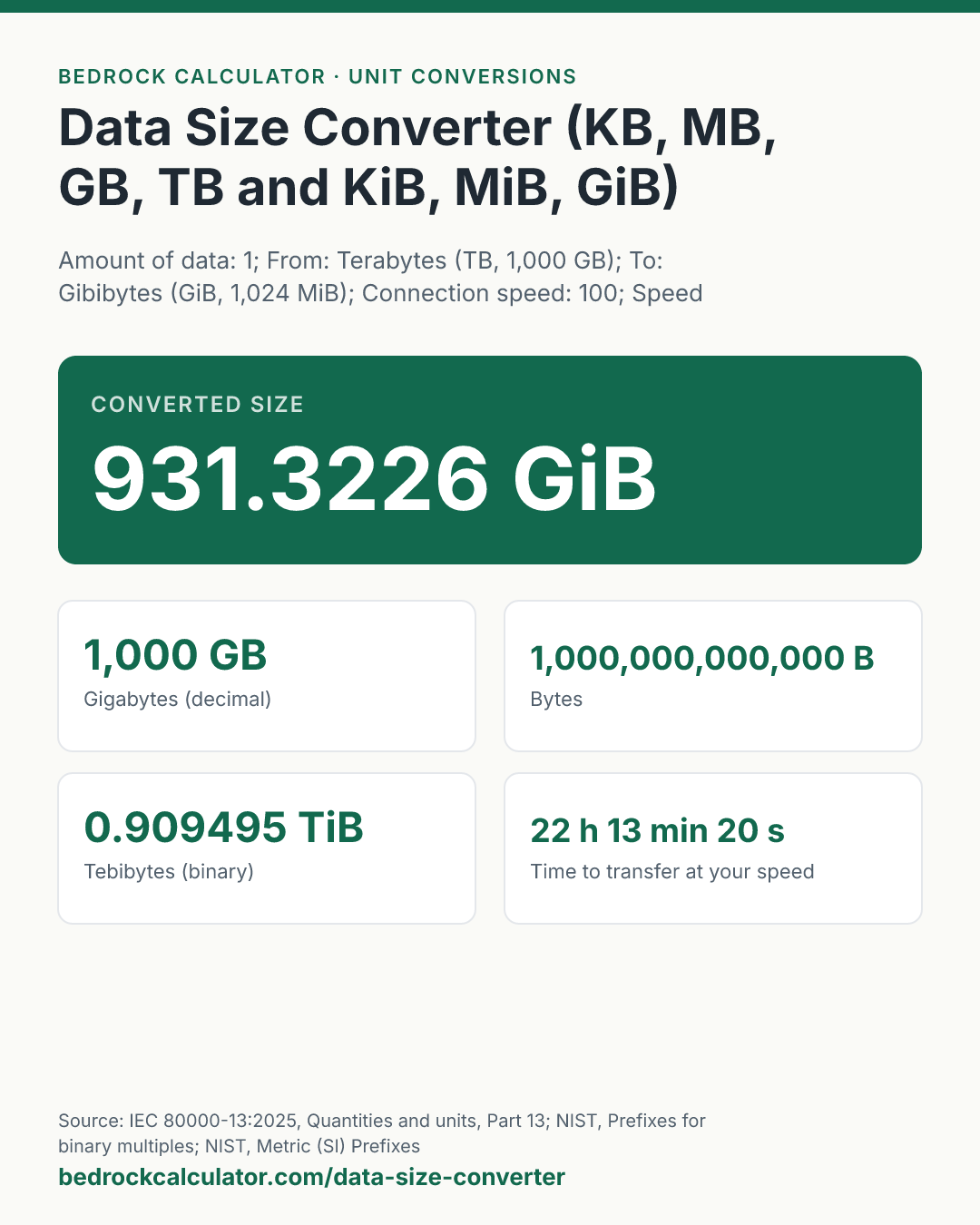

Quick Answer: A 1 TB drive holds 931.3226 GiB, which is the figure Windows shows, labelled GB. A megabyte is 1,000 kilobytes, 2,500 MB is 2.5 GB, and a 256 GB phone shows 238.4186 GiB in binary units.
What does this calculator do?
This data size converter changes an amount of data between bits, bytes, the decimal units (kilobytes, megabytes, gigabytes, terabytes) and the binary units (kibibytes, mebibytes, gibibytes, tebibytes). Pick the unit you have and the unit you want, and every common unit is listed under the answer, decimal and binary side by side.
There are two systems because computers count in powers of two. The SI prefixes kilo, mega and giga mean 1,000, 1,000,000 and 1,000,000,000, and that is how drive makers, phone makers and network providers use them. Memory and many operating systems count in powers of 1,024 instead. In 1998 the International Electrotechnical Commission gave those binary multiples their own names, kibi, mebi, gibi and tebi, now set out in IEC 80000-13, so that "kilobyte" could keep meaning exactly 1,000 bytes.
Who uses which? Drive and phone makers print decimal sizes: a 1 TB drive holds 1,000,000,000,000 bytes. Windows counts in binary but still labels the result GB and TB, which is why that drive shows up as roughly 931 GB. Current macOS and iOS report storage in decimal units, matching the box; Apple says the binary count was used up to OS X Leopard and iOS 10. Nothing is missing from the drive. The same bytes are being counted in two different units.
The converter also tells you how long the amount takes to move over a connection, given its speed in bits per second.
Using the Data Size Converter
- Type the amount of data.
- Choose its unit in From and the unit you want in To. Each unit in the list shows its size, so kB (1,000 B) and KiB (1,024 B) are easy to tell apart.
- Enter your connection speed and its unit if you want the transfer time. Internet plans are sold in megabits per second.
- Read the converted size at the top. The cards list bytes, the four decimal units, the four binary units, the transfer time, and your speed in megabytes per second.
The preset buttons load a megabyte in kilobytes, 2,500 MB in gigabytes, a 50 GB download on a 1000 Mbps plan, and a 256 GB phone.
How is this calculated?
- Choose the units. A negative amount is read as zero.
- Convert through the bit. Each unit is stored once as its exact size in bits. A byte is 8 bits. The decimal units are powers of 1,000 of the byte, so a gigabyte is 8 × 10⁹ bits. The binary units are powers of 1,024, so a gibibyte is 8 × 2³⁰ bits. The converter multiplies your number by the size of the unit you started in and divides by the size of the unit you want.
GiB = (TB × 10¹²)/2³⁰; MB = GB × 1000; KiB = bytes/1024
- Work out the transfer time. The amount is turned into bits and divided by the speed in bits per second. The result in seconds is split into days, hours, minutes and seconds, with seconds rounded to one decimal place.
seconds = (size in bits)/(speed in bits per second)
- Convert the speed to megabytes per second. Megabits per second divided by 8 gives megabytes per second, because a byte is 8 bits.
- Round for display only. The headline is shown to four decimal places and the cards to six, rounded half up with trailing zeros dropped.
Worked Example
The default, 1 TB to GiB:
- Bytes: 1 TB = 1,000,000,000,000 bytes.
- Gibibytes: 10¹² ÷ 2³⁰ = 931.3225746..., shown as 931.3226 GiB.
- Tebibytes: 0.909495 TiB. Mebibytes: 953,674.316406 MiB.
- At 100 Mbps: 8 × 10¹² bits ÷ 10⁸ bits per second = 80,000 seconds, which is 22 h 13 min 20 s. 100 Mbps is 12.5 MB/s.
How many kilobytes are in a megabyte? In decimal units, 1,000 kB. In binary units a mebibyte is 1,024 KiB; one decimal megabyte is 976.5625 KiB.
2,500 MB to GB: 2,500 ÷ 1,000 = 2.5 GB, or 2.328306 GiB.
A 50 GB game on a 1000 Mbps plan: 1000 Mbps is 125 MB/s, so the download takes at least 6 min 40 s. The game shows as 46.566129 GiB in Windows.
Advertised Size and What Your Computer Shows
| Advertised (GB) | Binary (GiB) | Binary (TiB) |
|---|---|---|
| 64 | 59.6 | 0.06 |
| 128 | 119.21 | 0.12 |
| 256 | 238.42 | 0.23 |
| 512 | 476.84 | 0.47 |
| 1,000 (1 TB) | 931.32 | 0.91 |
| 2,000 (2 TB) | 1,862.65 | 1.82 |
| 4,000 (4 TB) | 3,725.29 | 3.64 |
| 16,000 (16 TB) | 14,901.16 | 14.55 |
The gap grows with each prefix, because each binary step is 1,024 rather than 1,000 and the difference compounds. The table shows it directly: the binary figure falls further behind the advertised one as drives get bigger.
Download Time Calculator: 1 GB at Common Speeds
| Speed (Mbps) | MB per second | Time for 1 GB |
|---|---|---|
| 10 | 1.25 | 13 min 20 s |
| 25 | 3.125 | 5 min 20 s |
| 50 | 6.25 | 2 min 40 s |
| 100 | 12.5 | 1 min 20 s |
| 300 | 37.5 | 26.7 s |
| 500 | 62.5 | 16 s |
| 1,000 | 125 | 8 s |
These are best cases at the full line rate. Real downloads add protocol overhead and depend on the server and the network.
How Many Kilobytes Are in a Megabyte?
In the decimal units used by drive makers and most software today, 1,000. A megabyte is 1,000 kilobytes, a gigabyte is 1,000 megabytes, and a terabyte is 1,000 gigabytes. If someone means the binary units, the answer is 1,024 kibibytes in a mebibyte.
When a figure is written as KB or MB without saying which, look at where it came from: a drive label or an internet speed is decimal; a memory chip or a file size in Windows Explorer is binary.
What Is 1000 Mbps in GB?
1000 Mbps is a speed, not a size, so it converts to a size per second, not to a number of gigabytes. 1000 megabits per second is 125 megabytes per second, which is also written 1 Gbps.
To see what that means for a real file, enter the file size and the speed: at 1000 Mbps a 50 GB download takes at least 6 min 40 s.
What does this calculator not account for?
- Formatting and system space. A new drive or phone shows less free space than its binary capacity, because the file system and the operating system use some of it. That is separate from the unit difference.
- Protocol overhead. TCP/IP, Wi-Fi and encryption all add bytes on the wire, so a real download is slower than the line-rate time shown.
- Compression. A compressed file moves fewer bits than its unpacked size.
- Petabytes and beyond. The units stop at terabytes and tebibytes.
What mistakes do people make with this?
- Confusing bits and bytes. Speeds use a lowercase b (Mbps, megabits); sizes use an uppercase B (MB, megabytes). A byte is 8 bits, so a 100 Mbps line moves 12.5 MB each second.
- Thinking a drive is short. A 1 TB drive showing 931 GB in Windows is not defective. Both figures describe 1,000,000,000,000 bytes.
- Writing KiB as KB. If you mean 1,024 bytes, the IEC symbol is KiB. Writing KB for 1,024 bytes is what started the confusion.
- Using 1,024 for network speeds. Network rates are always decimal: 1 Mbps is exactly 1,000,000 bits per second.
Frequently Asked Questions
Why does my 1 TB drive show 931 GB?
How many MB are in a GB?
How do I convert MB to GB?
How long does it take to download 1 GB at 100 Mbps?
How many GB is a 256 GB phone really?
Does macOS use GB or GiB?
What is a kibibyte?
Sources
- IEC 80000-13:2025, Quantities and units, Part 13: Information science and technology (prefixes for binary multiples). webstore.iec.ch/en/publication/87379
- NIST, Prefixes for binary multiples: kibi, mebi, gibi and tebi, adopted by the IEC in 1998. physics.nist.gov/cuu/Units/binary.html
- NIST, Metric (SI) Prefixes: kilo, mega, giga and tera as powers of ten. nist.gov/pml/owm/metric-si-prefixes
- Apple Support, How iOS and macOS report storage capacity (decimal on packaging; binary reporting in OS X Leopard and earlier and iOS 10 and earlier). support.apple.com/en-us/102119
- Seagate Support, Why does my hard drive report less capacity than indicated on the drive's label (Windows counts in binary). seagate.com/support/kb/why-does-my-hard-drive-report-less-capacity-than-indicated-on-the-drives-label-172191en